Case Study
Steph’s Store
Inventory Management & Sales Analytics Web App
A custom, mobile-first inventory system built to replace spreadsheets, reduce manual work, and provide actionable insights across inventory, platforms, and profitability.
Project Snapshot
Project Overview
Steph’s Store is a custom inventory management and analytics web application built for a growing used-clothing resale business. The client had outgrown spreadsheets and needed a fast, reliable system to track inventory, understand sales performance, and make better buying decisions without adding operational overhead.
This project demonstrates Lobby Studio’s ability to translate a real-world workflow into a polished, production-ready internal tool — optimized for speed, clarity, and long-term scalability.
Design & Theme System
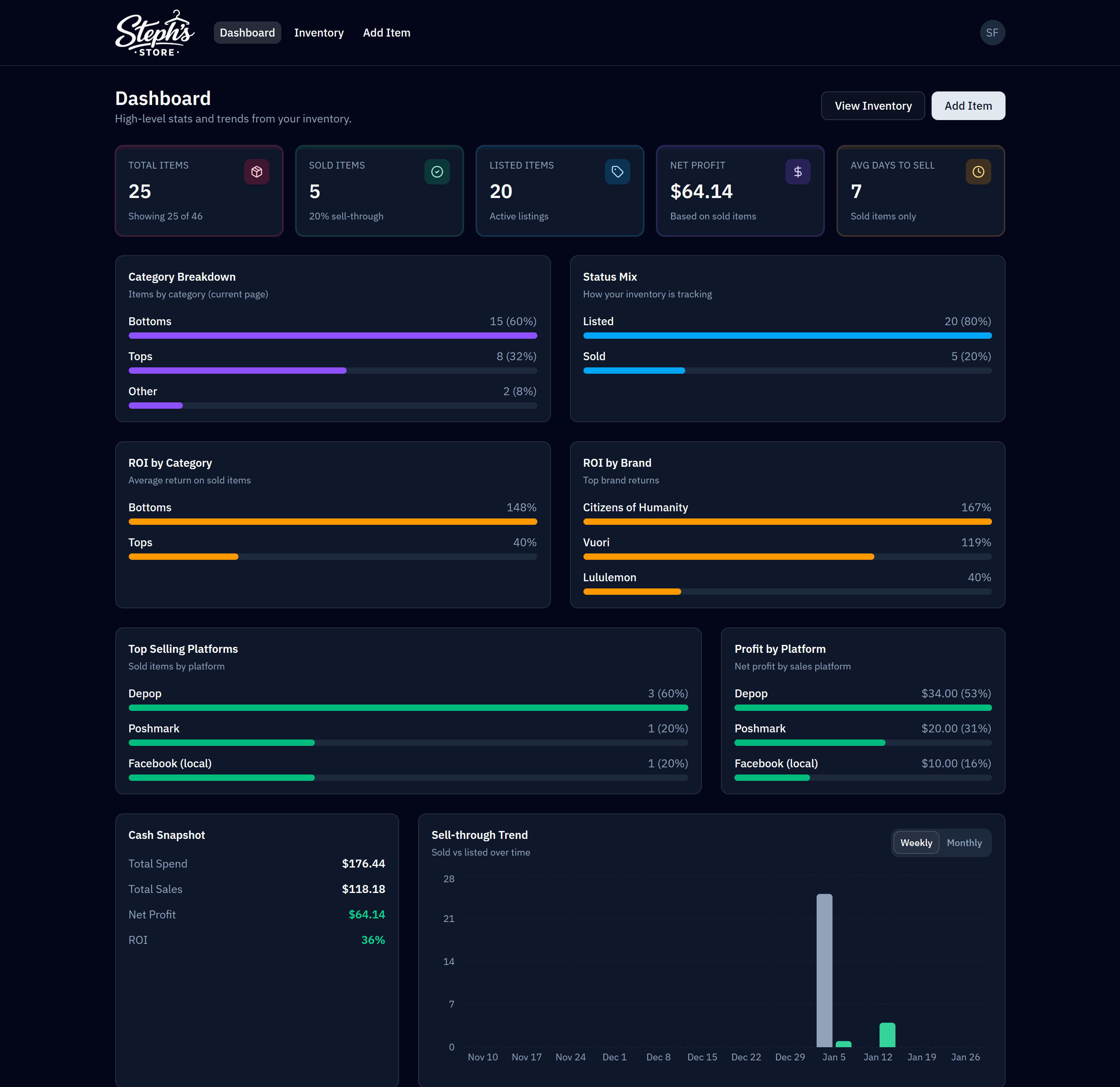
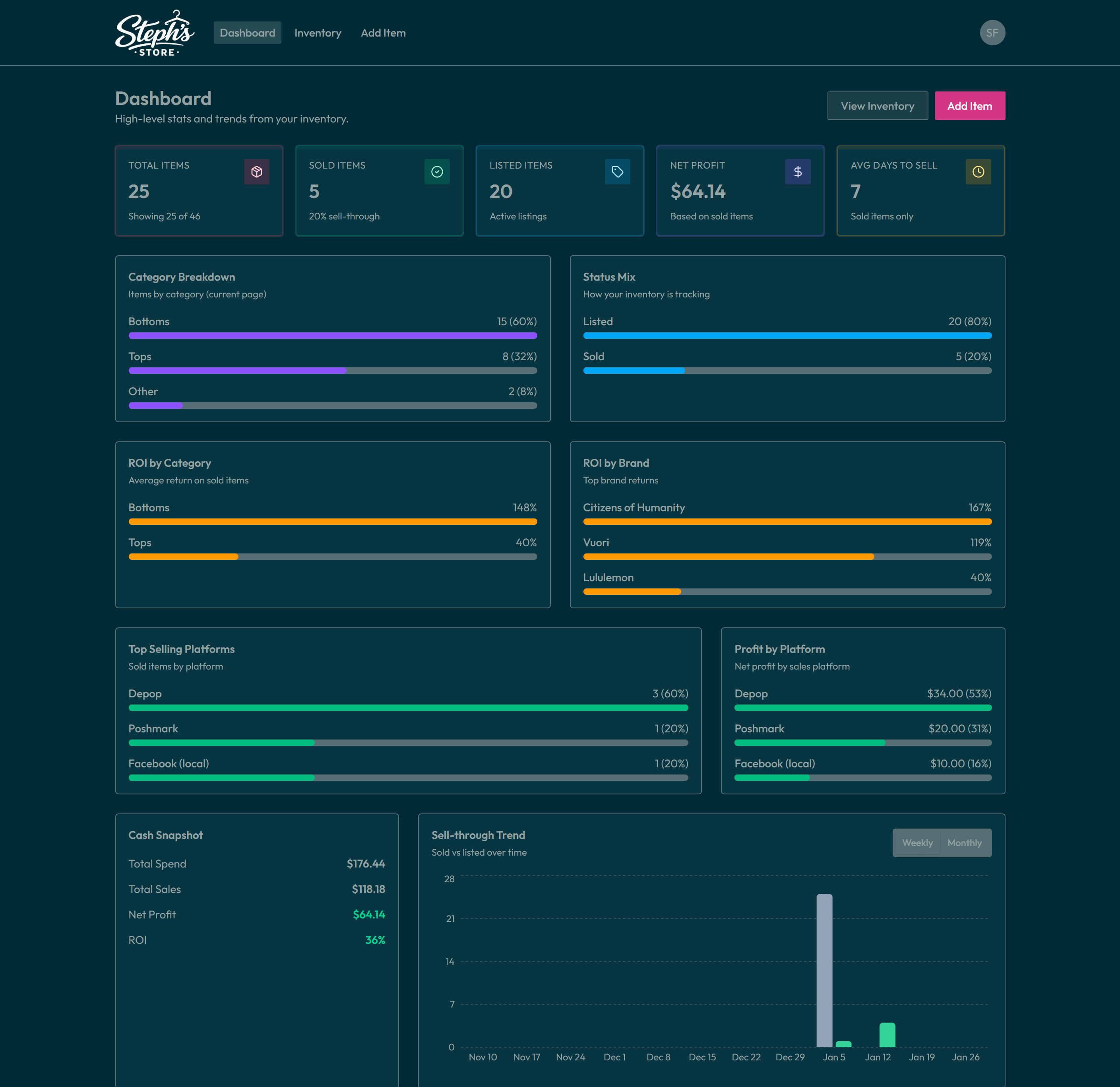
The Problem
The business initially managed inventory and sales across spreadsheets. As volume increased and listings expanded across platforms, the workflow became fragile and time-consuming.
Pain points
- Data fragmentation — inventory lived in multiple sheets with inconsistent formats.
- Manual errors — copy/paste workflows increased mistakes and cleanup time.
- No reliable insights — ROI, sell-through, and platform performance required constant manual formulas.
- Poor mobile experience — updating inventory while sourcing in-store was slow and frustrating.
- No access control — sensitive business data lacked secure authentication and allow-listing.
The client needed a purpose-built system that felt effortless on mobile, improved data integrity, and surfaced real performance signals automatically.
Goals & Requirements
The wishlist split cleanly into core operational needs and longer-term enhancements once the foundation was solid.
Must-haves
Core Requirements
- Mobile-first, fast web application
- Secure authentication with email allow-listing
- Persistent database (spreadsheets not the source of truth)
- Full inventory CRUD (Create, Read, Update, Delete)
- Advanced filtering, sorting, and search
- Clear analytics and performance insights
- Spreadsheet import for historical data
Nice-to-haves
Additional Feature Requests
- Light/dark mode toggle + multiple themes
- Sales analytics + platform-level breakdowns
- Bulk actions for inventory items
- Advanced sorting
- Duplicate item workflow
- Aging indicators for listings
Solution Strategy
Instead of forcing the client into generic inventory software, Lobby Studio designed a custom workflow around how resale businesses actually operate: sourcing quickly, listing across platforms, tracking costs and fees, and making decisions based on ROI and velocity.
Guiding principles
- Reduce friction Fast entry and editing, especially on mobile.
- Improve data integrity Structured fields and validation to eliminate spreadsheet drift.
- Turn data into decisions Metrics and dashboards that answer real operational questions.
- Lower migration risk Smooth import path from spreadsheets into a persistent system.
Why NocoDB?
Data layer choice
Spreadsheet familiarity, database reliability
The client needed the reliability of a real database, but still wanted the comfort of “spreadsheet-style” data interaction.
This reduced migration friction, improved confidence in the data, and created a foundation that can grow with the business — without locking the client into a proprietary platform.
Core Screens
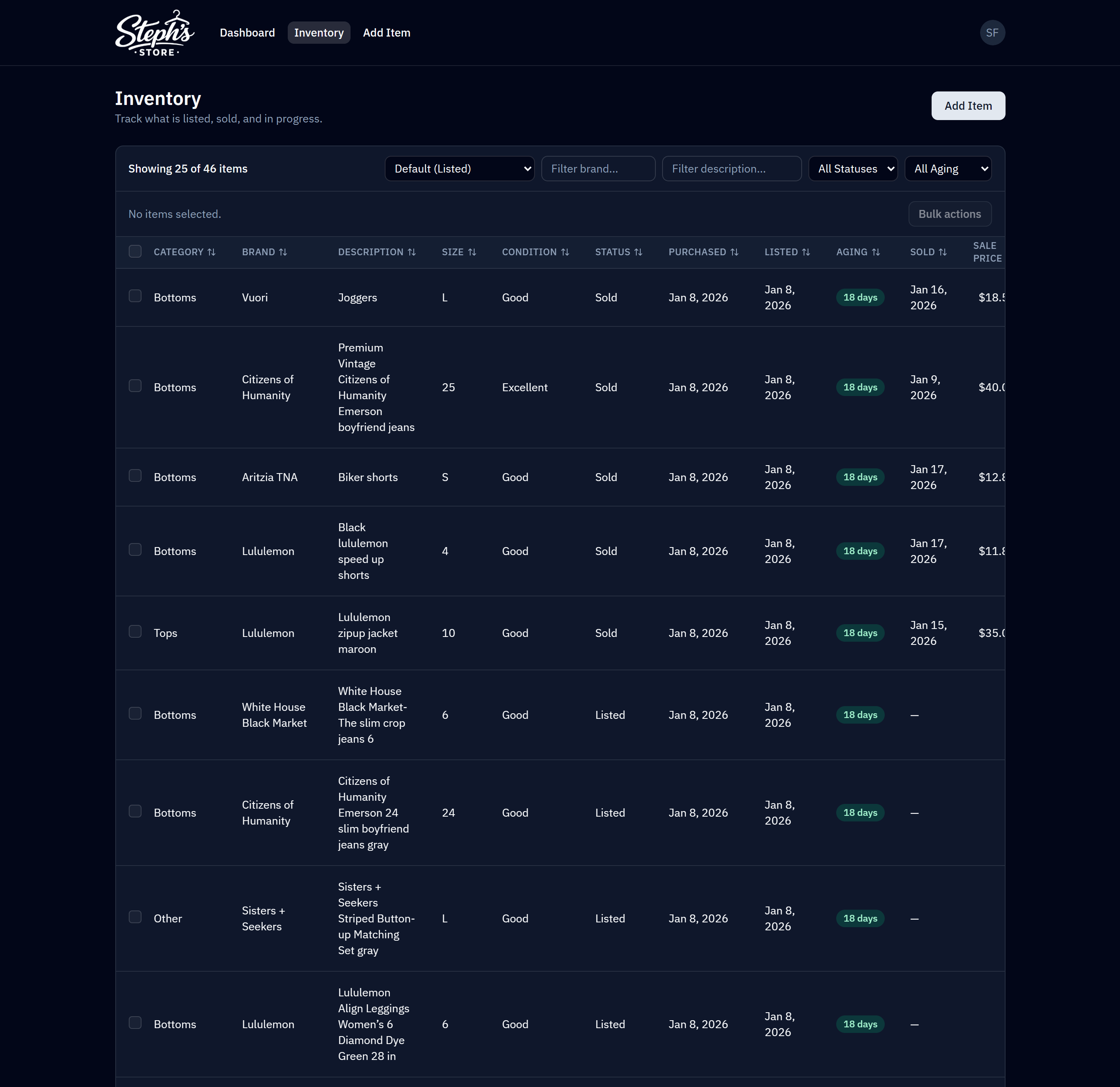
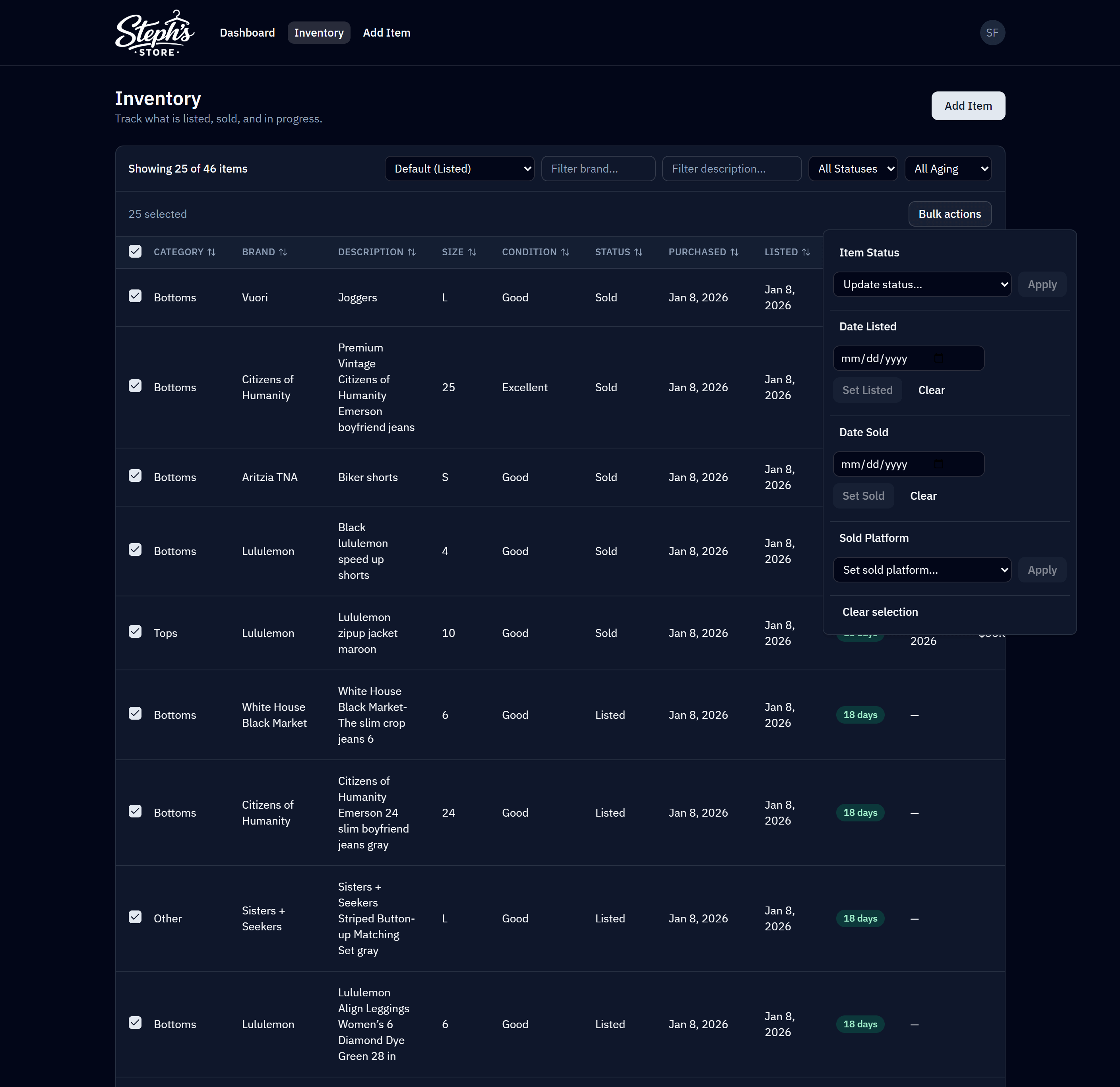
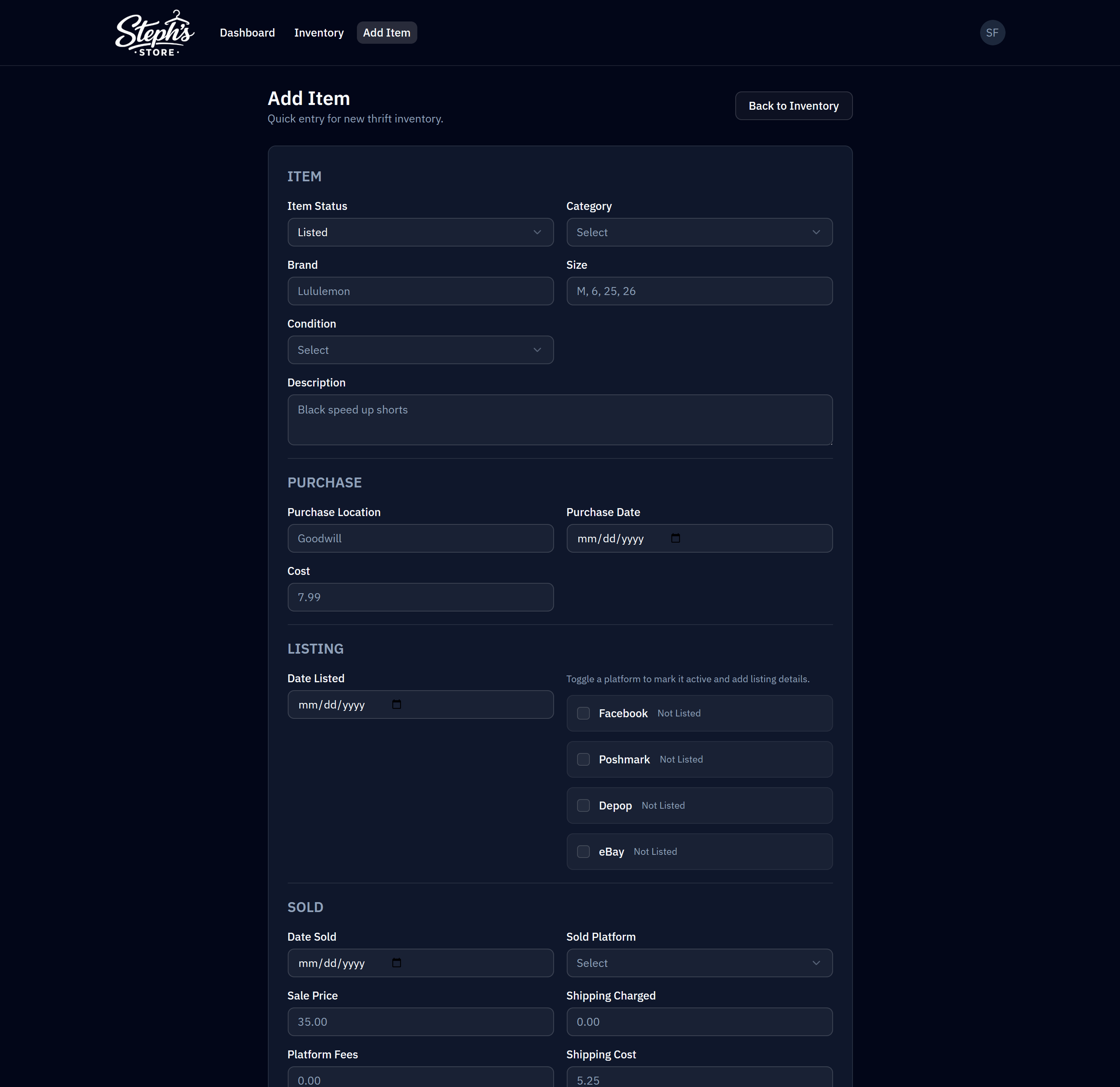
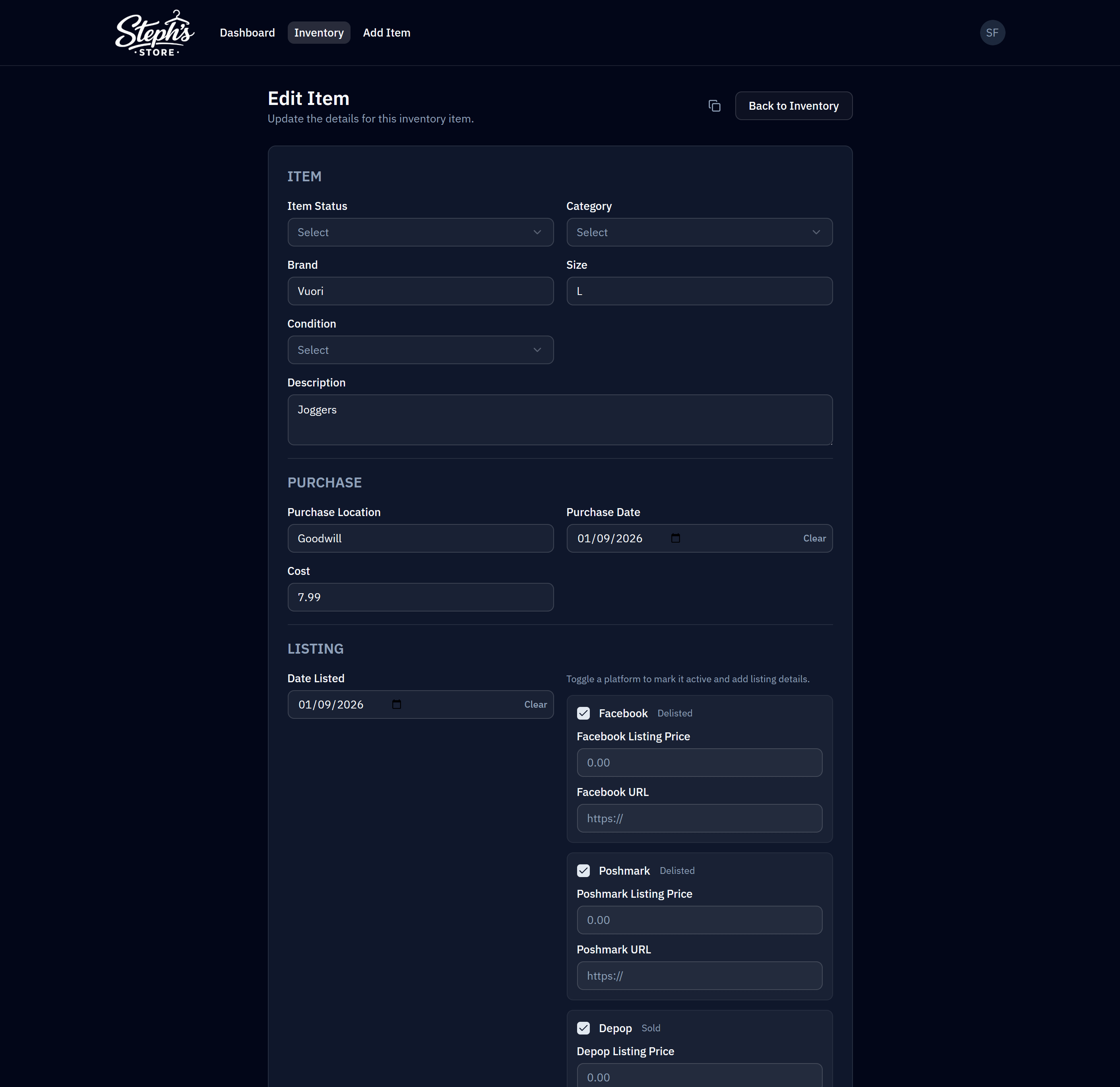
Key Features
A fast, mobile-first workflow backed by structured data, insights, and tools that cut down repetitive work.
Inventory Dashboard
- Total items, listed items, and sold items
- Net profit and ROI
- Average days to sell + sell-through rate
- Breakdowns by category, brand, and platform
- Sell-through trend visualization over time
Inventory Management
- Add, edit, and delete items with structured validation
- Track brand, category, size, condition, and descriptions
- Capture purchase cost, purchase date, and sourcing location
- Track listing state and sold state across platforms
Advanced Filtering & Sorting
- Filter by brand, category, status, aging, and description
- Sort by key operational fields (purchase, listed, sold, profitability)
- Combine filters to answer questions quickly (velocity, ROI, stale inventory)
Bulk Actions
- Update item status in bulk (listed/sold workflows)
- Set dates (listed/sold) across many items at once
- Assign platforms or clear fields across selections
- Reduce repetitive work during sourcing/listing sessions
Sales & Platform Analytics
- Net profit per item
- ROI by category and brand
- Profit by platform
- Sell-through trends that help guide sourcing decisions
Spreadsheet Import & Data Migration
- Import historical spreadsheet data via NocoDB
- Normalize into structured Postgres tables
- Replace spreadsheets as the source of truth
- Keep a spreadsheet-style admin view for confidence and transparency
Themes & Visual Customization
- Light/dark mode support
- Multiple themes
- Comfortable, high-contrast UI for long sessions
Results & Impact
Outcome summary
By pairing a custom frontend with a Postgres + NocoDB data layer, Steph’s Store gained the best of both worlds: ease of use and operational reliability.
- Faster inventory updates Especially on mobile.
- A real database Replaces fragile spreadsheet files.
- Spreadsheet-style admin access Available when needed via NocoDB.
- Clear visibility into profit and ROI No manual formulas required.
- Reduced errors Structured inputs and validation.
- Actionable insights Directly influence sourcing decisions.
- A scalable foundation Evolves with the business.
What was once a manual, error-prone workflow is now a streamlined system built around clarity, speed, and data integrity.
What This Demonstrates
Studio principles
This project captures how Lobby Studio approaches internal tools: clarity first, performance always, and systems that scale with real operations.
- Design around real workflows Build for actual day-to-day operations, not generic templates.
- Prioritize speed and usability Fast, readable interfaces on every screen.
- Replace spreadsheet chaos Structured data with confidence and control.
- Deliver decision-ready insights Dashboards that guide inventory and sourcing.
- Build foundations that scale Systems that grow as the business expands.